
Read conversion and drop-off
A funnel counts people who reached its first step, then checks their later actions in order. It does not count every occurrence as a new attempt.
Read the report
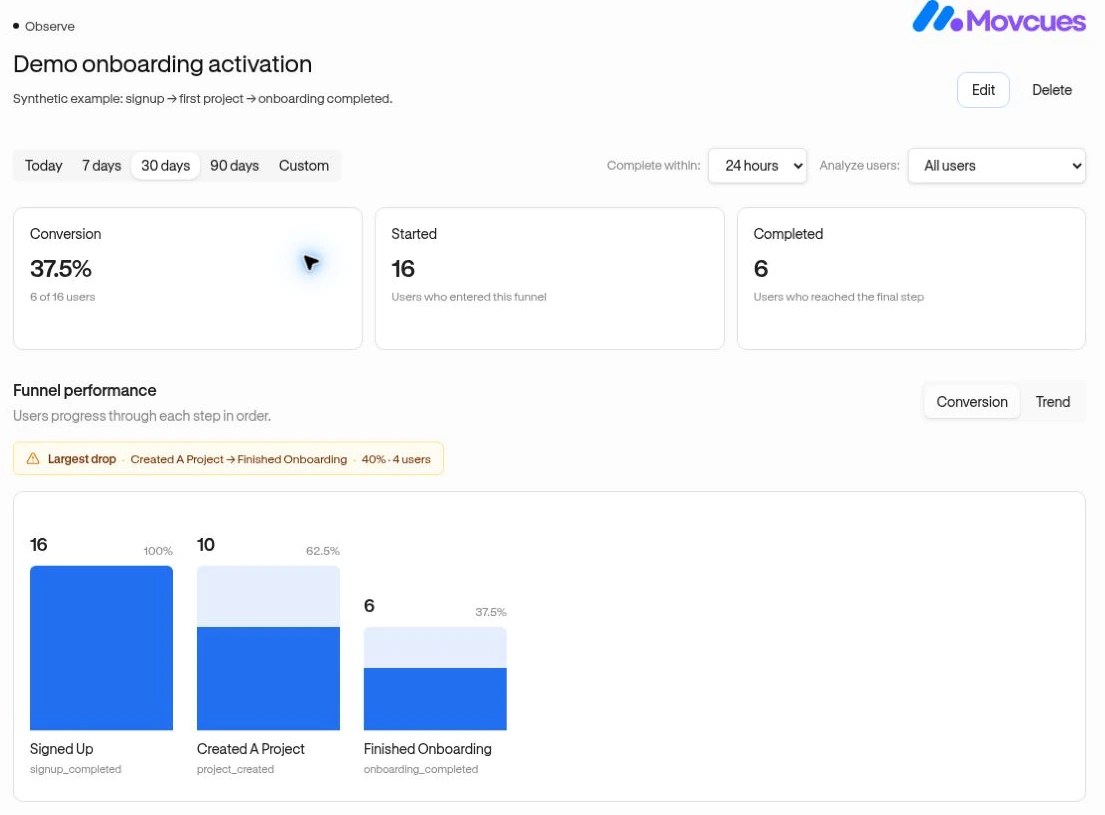
Section titled “Read the report”- Open a funnel under Observe → Funnels.
- Select the date range for entry into the first step.
- Use Complete within to test a conversion window and Analyze users to select a saved Segment or All users.
- Review Conversion, Started, and Completed.
- Use Conversion for the step breakdown or Trend for conversion by entry day.
- Open a step name or user count to inspect the people who reached it.
Changing Complete within in the report changes this analysis; edit the funnel if you want to change its saved default.
Worked example
Section titled “Worked example”Illustrative counts: 100 people start, 60 reach project creation, and 30 invite a teammate.
| Measurement | Calculation | Result |
|---|---|---|
| Overall conversion | 30 final completers ÷ 100 starters | 30% |
| Project-creation step conversion | 60 ÷ 100 | 60% |
| Invitation step conversion | 30 ÷ 60 | 50% |
| Dropped after project creation | 60 − 30 | 30 people |
Largest drop compares the percentage lost between adjacent steps. It does not establish why people stopped.
Timing rules that matter
Section titled “Timing rules that matter”- Each person starts from their earliest first-step occurrence within the selected entry period.
- A later step must have a strictly later timestamp than the preceding step and fit within the window measured from that first occurrence.
- Later steps can fall after the selected period ends if they still fit inside that conversion window.
- A missing intermediate step prevents later steps from counting. A second attempt is not automatically a fresh funnel entry in the same analysis.
- Recent starters may still have time to finish. Their current drop-off is not necessarily final abandonment.
The Segment filter uses current membership. Anonymous and identified activity are counted according to the identity recorded with the event.