
Control repeats, scheduling, and priority
Timing limits when eligible users can see an experience. Start with the least repetition that serves the task, such as showing first-run guidance only once.
Choose repeat behavior
Section titled “Choose repeat behavior”Use Review & publish or Editor options → Launch settings.
| How often should someone see it? | Effect |
|---|---|
| Only once | A recorded showing prevents another automatic showing for that identity. Dismissing is not required. |
| Once per session | Prevents another automatic showing in the same recorded session. |
| Whenever they qualify | Allows later qualifying evaluations, subject to other caps and active experience handling. It is not continuous redisplay. |
For Whenever they qualify, open Advanced frequency in Launch settings. Wait before showing again adds a cooldown in hours or days. Maximum times per user caps recorded impressions. These can require an advanced plan.
Example: a helpful feature reminder might allow later qualifying visits but wait seven days between showings. Repeated testing with the same visitor may correctly produce no new display.
Set an active window
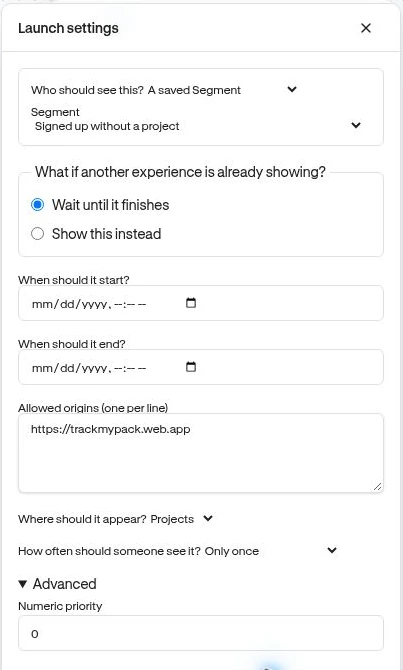
Section titled “Set an active window”In the review, Start time and End time are optional. Outside that window, the experience does not qualify. The editor’s launch settings show the equivalent controls as When should it start? and When should it end? Check the intended date and local time carefully before publishing.
Handle another experience
Section titled “Handle another experience”Under Advanced, Wait until it finishes avoids interrupting an active experience. Show this instead permits supported higher-priority interruption. Numeric priority orders competing eligible experiences: higher numbers take precedence.
The current runtime supports interruption of a lower-priority active guide; do not assume every widget type can be replaced midway. Keep the default waiting behavior unless you have tested the intended overlap. Checklists are handled separately as a persistent companion rather than ordinary transient widgets.
Verify
Section titled “Verify”Test the normal visit, a repeat visit, and any intended overlap. Check audience and pages too. Publishing a revised draft is not a guaranteed reset of existing visitor history. Use delivery troubleshooting when an experience stops appearing after the first test.