
Choose who sees an experience and where
Audience targeting chooses the people. Page targeting chooses where the experience can start. A visitor must meet the relevant conditions together; choosing a Segment does not bypass the page rule.
Example
Section titled “Example”Show project-setup guidance only to a saved “Signup without project” Segment on the project setup Page. This is more precise than showing it to everyone who opens the product.
Set the audience
Section titled “Set the audience”- Open an experience and choose Review & publish.
- At Who should see this experience?, choose:
- Everyone for all otherwise eligible visitors.
- A saved Segment and choose a Segment.
- Combined Segment rules to combine saved audiences.
- For combined rules, choose All rules or Any rule, then use is in / is not in and Add Segment rule.
Combined rules can require an advanced plan. Segments use current membership, and missing or deleted references cannot qualify users. Check the Segment’s members before relying on it.
Set the page
Section titled “Set the page”At Where should this experience appear?, choose Selected page and a saved Page, or deliberately choose All pages. Create the Page definition first if needed.
The experience copies the selected Page’s rules. After editing a Page definition, review the experience’s saved rules and republish if you want that change applied. The build page used to design the experience is not a substitute for reviewing launch targeting.
Check domains and targets
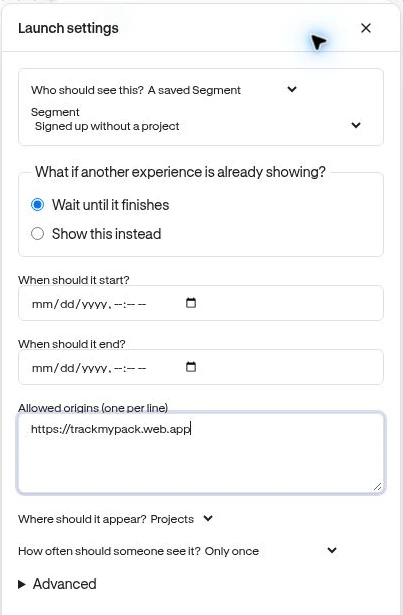
Section titled “Check domains and targets”The product’s origin must match the site configuration. Optional Allowed origins (one per line) in Editor options → Launch settings can narrow delivery further. Origin means scheme plus host and optional port, such as https://app.example.com.
An anchored experience also needs its target element on that page. A matching path alone cannot make a missing element appear.
Verify
Section titled “Verify”Test one matching user on the intended page and one nonmatching user. Then test the right user on a page that should be excluded. Publish only after the review summary describes those boundaries correctly.
Next: Choose a trigger · Timing and frequency.