
Introduce a feature to relevant users
A feature announcement is more useful when it reaches someone who can benefit from it and has not already used it. This example introduces CSV exports to trial users visiting Reports.
Before you start
Section titled “Before you start”The app sends report_exported after successful export and supplies an identified user’s plan property. Create a saved Reports Page and confirm both inputs in Events and Users.
Build the audience
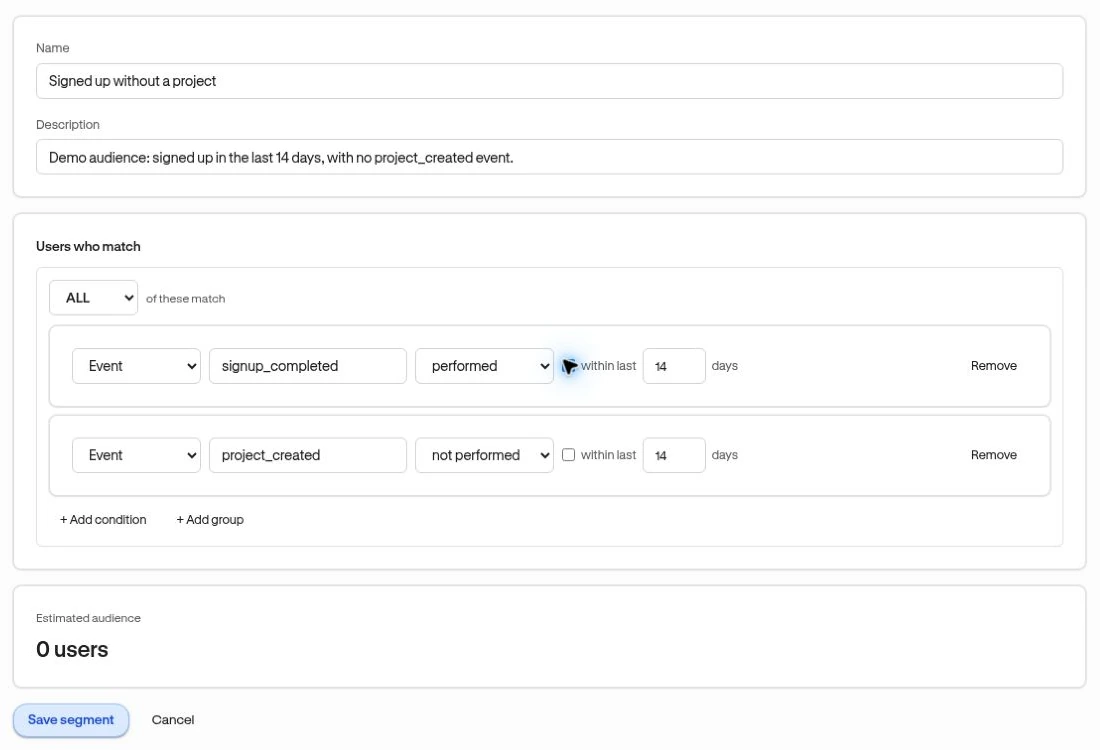
Section titled “Build the audience”- Create a segment using ALL conditions.
- Add User property → plan → equals → trial.
- Add Event → report_exported → not performed. Decide whether “never recorded” or a recent time window is appropriate.
- Inspect the estimated audience and a few members, then save.
This finds known matching users, not everyone who has ever signed up in another system. Missing tracking can make someone look like a non-adopter.
Add contextual guidance
Section titled “Add contextual guidance”Create an Anchored card from Experiences → Other. Use the live editor to point it at the export control, explain what export provides, and configure a useful button action. A short guide is an alternative if export needs several steps.
Choose the moment
Section titled “Choose the moment”In Review & publish, choose A saved Segment, the Reports Page, and When the user reaches the page. Review frequency so the reminder is useful without becoming repetitive. Test a qualifying user and someone who has already exported.
Review the product outcome
Section titled “Review the product outcome”Check the experience’s delivery and engagement. Separately track report_exported with a dashboard card. An announcement click is not a completed export, and current non-adopter membership changes after adoption.
If people still struggle, ask a focused survey question rather than assuming the announcement text is the only problem.