
Manage your plan and usage
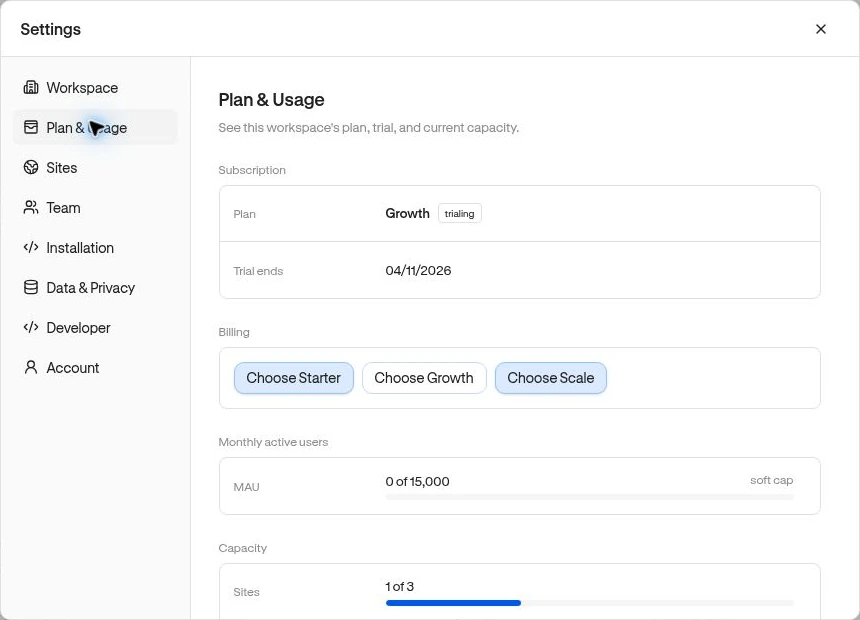
Open Settings → Plan & Usage to see the workspace’s subscription, trial information, monthly active users, and resource capacity. Use the displayed limits as the current allowance for your workspace.
Review capacity
Section titled “Review capacity”The page shows Sites, Members, Dashboards, Segments, Funnels, and Published experiences. These are different from the number of users visiting your product.
Example: an unused pending invitation can still occupy a team seat. Revoke it in Team settings if it should no longer be valid. If a resource limit prevents creation, remove an unused resource where appropriate or choose a plan with more capacity.
Choose or manage a subscription
Section titled “Choose or manage a subscription”Owners and Admins can use the billing actions when billing is configured.
- Open Settings → Plan & Usage.
- For an eligible trial, expired, or canceled subscription, choose Choose Starter, Choose Growth, or Choose Scale to open Paddle checkout.
- For an active subscription, choose Manage billing to open the Paddle customer portal for payment details, invoices, and available subscription changes.
- After completing an action, return and reload Plan & Usage to confirm the subscription state.
If checkout fails to open, read the visible error and try once more after reloading. If the problem persists, contact support with the workspace ID and error text; do not send payment-card details. A checkout transaction being created is not proof of a completed subscription.
What MAU means here
Section titled “What MAU means here”Billable monthly active users count distinct identified product users with recorded activity from each site’s configured production origin in a UTC calendar month. Anonymous visits alone do not add an identified MAU. This can differ from a broad analytics Unique users count.
The MAU allowance is a soft cap: crossing it prompts an upgrade request but does not stop collection or existing experience delivery. Other resource limits and advanced-feature access can still restrict creation or configuration.
Advanced audience combinations, event/manual launches, scheduling, frequency caps, guide progression, and orchestration are plan-dependent. If a change is blocked, check the available plan options rather than repeatedly republishing.
Related: Missing data · Publishing.