
Create a segment
A segment is a saved set of conditions that finds people matching a product situation. Membership is recalculated from current data; it is not a fixed mailing list.
Example: users who have not created a project
Section titled “Example: users who have not created a project”Assume your app sends signup_completed and project_created. Create an audience of people who signed up recently but have not created a project.
Before you start
Section titled “Before you start”Select the right site and use an Owner or Admin account. Confirm that the event names exist in Observe → Events. Property-based segments need identified users with those properties.
Build the audience
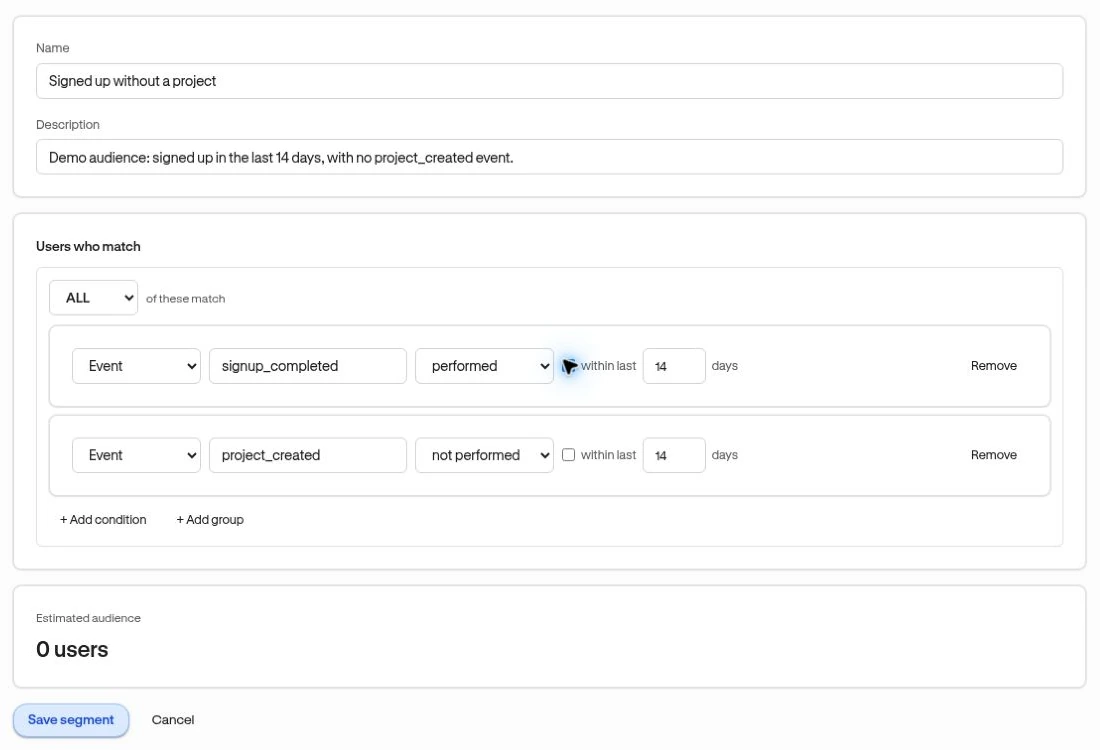
Section titled “Build the audience”- Open People → Segments and choose Create segment.
- Enter Name and an optional Description.
- Keep Users who match → ALL of these match.
- For the first condition, choose Event, enter
signup_completed, and choose performed. Enable within last and enter14days. - Choose + Add condition. Set Event → project_created → not performed. Leave its time window off if you mean no recorded project creation at any time.
- Review Estimated audience. Finish every condition before expecting an estimate.
- Choose Save segment.
Verify the result
Section titled “Verify the result”Open a member from the segment’s Users list and inspect their activity. A known user who completes the missing action should stop qualifying when membership is evaluated again.
No matching users can be a valid result. First check event spelling, the site, the time window, and how conditions combine.
Next: Target an experience or manage membership.