
Define pages and matching rules
A Page is a named group of URL paths. It organizes recorded visits and gives your team a reusable page choice in segments, funnels, and experience setup. Creating a Page does not add a new page to your website.
Create a Page
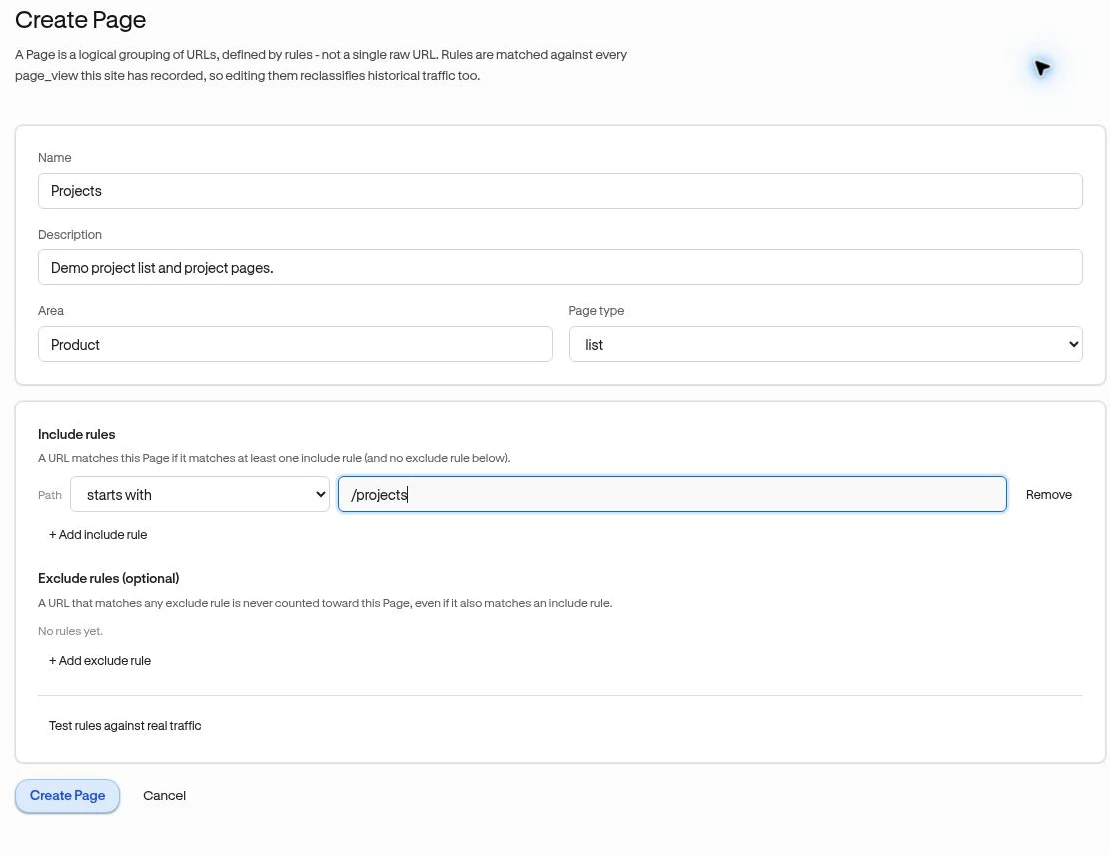
Section titled “Create a Page”- Open Observe → Pages and choose Create Page.
- Enter Name and optional Description.
- Set Area and Page type if useful. Area is an organizational label, such as “Reporting”; it is not an element selector or heatmap region.
- Add at least one Include rule. Rules compare the Path, such as
/reports, rather than the full domain. - Add Exclude rules (optional) to remove unwanted matches.
- Choose Test rules against real traffic and inspect matched and unmatched examples.
- Choose Create Page.
You need Owner or Admin access to save changes. Testing relies on traffic already received for this site; an empty preview does not by itself mean a rule is invalid.
Example: project screens
Section titled “Example: project screens”Include paths that starts with /projects/, but exclude the path that is exactly /projects/new. At least one include rule must match and no exclude rule may match. Multiple include rules act as alternatives.
| Operator | Example |
|---|---|
| is exactly | /pricing |
| starts with | /projects/ |
| ends with | /settings |
| contains | /reports |
| matches pattern (use * as wildcard) | /projects/*/settings |
Review and maintain
Section titled “Review and maintain”Open the saved Page to see Views, Unique visitors, Sessions, Last seen, and Matched URLs. Edit changes the rules; Save changes applies them to recorded history too. A Page’s definition is evaluated against existing page views, rather than only future traffic.
Experience page targeting copies the selected Page rules into the experience. If you later edit the Page, review and republish the experience’s own targeting as needed.
Delete removes the definition, not the underlying traffic. Check dependent funnels and segments first. Heatmaps is currently Coming soon.
Related: Funnels · Page targeting.