
Collect feedback after a product task
Ask about a task after the person has actually completed it. This example asks how easy it was to export a report, rather than interrupting users as soon as they sign in.
Prepare the inputs
Section titled “Prepare the inputs”Confirm report_exported is recorded after export success in Events. Choose the site, product Page, and audience. You need Owner or Admin access and plan access to an event-triggered launch.
Build a short survey
Section titled “Build a short survey”- Open Experiences → Surveys → Create survey.
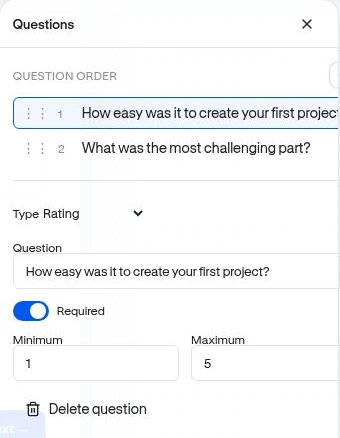
- Add a Rating question such as “How easy was it to export your report?” Use a clearly explained 1–5 scale.
- Add an optional Long text question asking what could be improved.
- Check required-answer behavior and the Survey: Submit button action.
- Preview the survey through submission.
Launch at the right moment
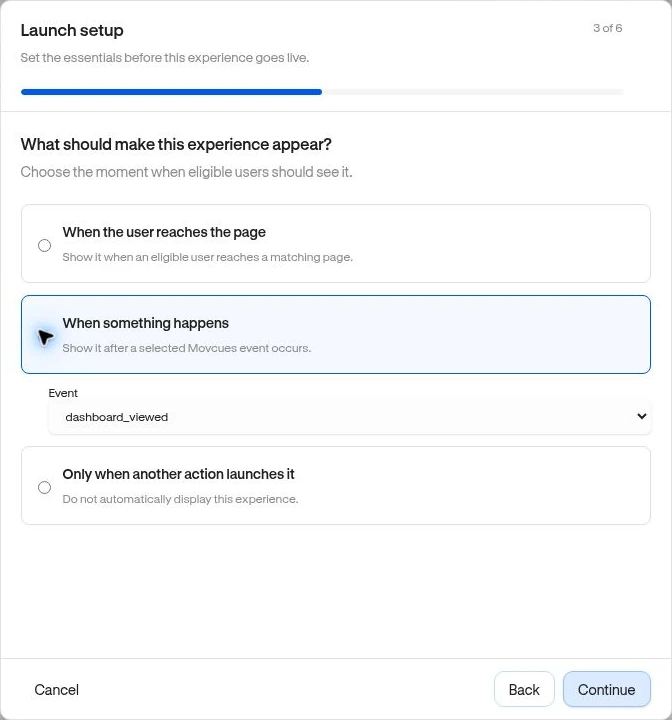
Section titled “Launch at the right moment”Choose Review & publish → When something happens → report_exported. Set a suitable Page and audience, then limit repeat exposure. Complete the review and test a fresh export as an eligible user outside the editor.
Read and investigate
Section titled “Read and investigate”Open View Results. Use Overview to check response rate and Responses to read submissions. Under Investigate, choose a structured answer group, inspect respondents, and optionally Create segment for relevant follow-up.
The response Segment is dynamic. For NPS it uses the selected score’s category, not necessarily that one score; inspect the resulting definition. Text answers can inform a decision but are not an automatic generic condition in the Segment builder.
Follow up with guidance only when the feedback and activity support it. A low rating indicates reported difficulty; inspect the context before assigning a cause.
Related: Survey results · Target an audience.